Self-hosted network visibility and security · IT, IoT and OT
Know every device.
Understand your network.
Detect what matters.
DENIS discovers the devices on your network, monitors IT and industrial network activity, flags suspicious behaviour and helps you investigate it. It is built for small businesses and industrial sites without a security team, runs on a machine you control, and needs no software on the devices it watches.
Community edition: free for personal, non-commercial use on up to 100 devices. Organisations may evaluate it free for 30 days. Information for organisations.
- Self-hosted
- No endpoint agents
- Passive-first
- No telemetry


DENIS 4.4.3 on its built-in demo network. The devices and alerts are fictional.
The problem
Most networks change faster than anyone can keep track of.
Many organisations cannot say what is connected, what it talks to, or what changed since yesterday. That is rarely negligence; it is a lack of time and tools.
- Devices nobody listed. Cameras, door controllers, a supplier’s service laptop: they join without a ticket or an owner.
- An inventory out of date. A spreadsheet knows what someone entered, not what joined last week.
- Little view inside. The firewall sees the perimeter, not the printer talking to the file server or a laptop talking to a PLC.
- Industrial traffic unwatched. Who writes to a controller, and who sent it a stop or a new program?
- Investigations from nothing. No record of which device talked to which, and how that differs from a normal day.
- No security staff. An IT person for part of the week. Alerts have to explain themselves.
What DENIS does
Discover. Detect. Investigate and respond.
Three jobs in one self-hosted program. Detection works NDR-style, from passive network traffic; response works NAC-style, by asking the switches and firewalls you already own to block or quarantine a device. Detection is the core; response is optional and always under a person’s control.
- 01 · Discover
Know what is connected
- Passive discovery from ARP, DHCP, mDNS, SSDP, LLDP/CDP and PROFINET
- Manufacturer, type and operating system, with the evidence shown
- An asset inventory with owners, locations and a review queue for new devices
- 02 · Detect (NDR-style)
Notice what matters
- A baseline per device: destinations, ports, volume and active hours
- Rules for new devices, rogue DHCP, ARP and gateway hijacks, scans, known-bad addresses and connections from the internet
- A 0–100 score built from named reasons, not a black box
- 03 · Investigate and respond (NAC-style)
Understand it, then act if you decide to
- Incidents that group related alerts, with a timeline and the devices involved
- Findings with a concrete fix, and exports to your SIEM or ticketing
- Optional block or quarantine through supported switches and firewalls: previewed, time-limited, off by default
IT, IoT and OT
One view of a mixed network, without touching the process.
Laptops, cameras and PLCs often share switches but not tools; most cannot run agents, and some industrial devices dislike scans.
- Passive monitoring. DENIS reads a copy of the traffic from a mirror (SPAN) port or tap: not in the traffic path, nothing installed on devices.
- Industrial devices are only listened to. Never pinged or scanned; the OT profile switches all active discovery off.
- Industrial protocols decoded. Modbus, S7comm, EtherNet/IP, DNP3, OPC UA, IEC 104, IEC 61850, PROFINET and more: who reads, writes or sends commands.
- What it cannot see. Traffic that never reaches its ports, encrypted content, written values. Not yet run on live traffic at a real industrial site: plan a trial period.
- Your networkPCs · servers · cameras · PLCs · HMIs
- SPAN / mirror port or TAPread-only copy
- one way
- DENISdecodes, does not transmit on the mirror
- Inventory
- Communications
- Baselines
- Alerts
- Evidence
The console
What you work with every day.
Screenshots of the DENIS console on its built-in demo network: a fictional company with an office, a production hall and a branch site.
-
Network map
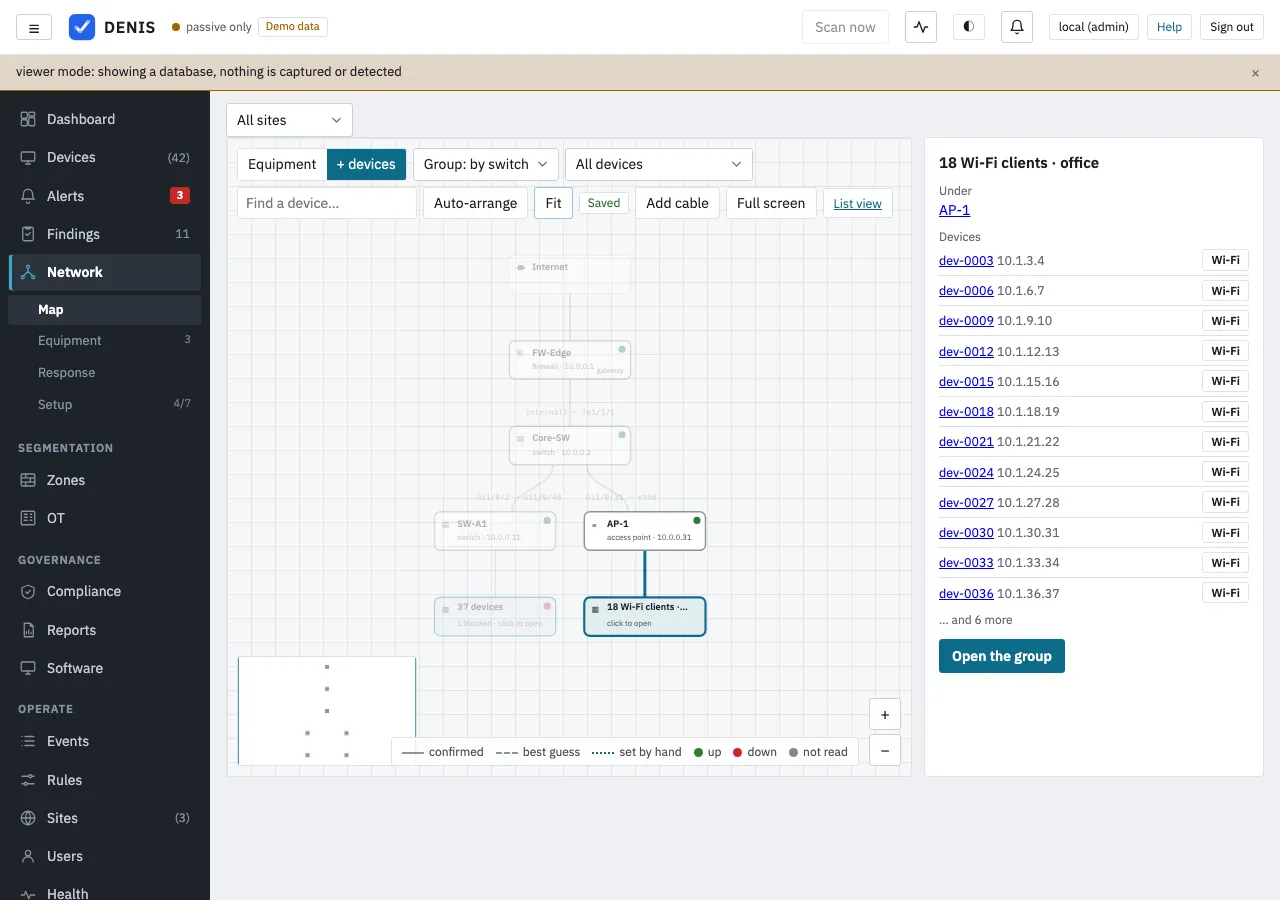
See how your network is really cabled: every switch, firewall and access point, and which devices sit behind each one. -
Equipment
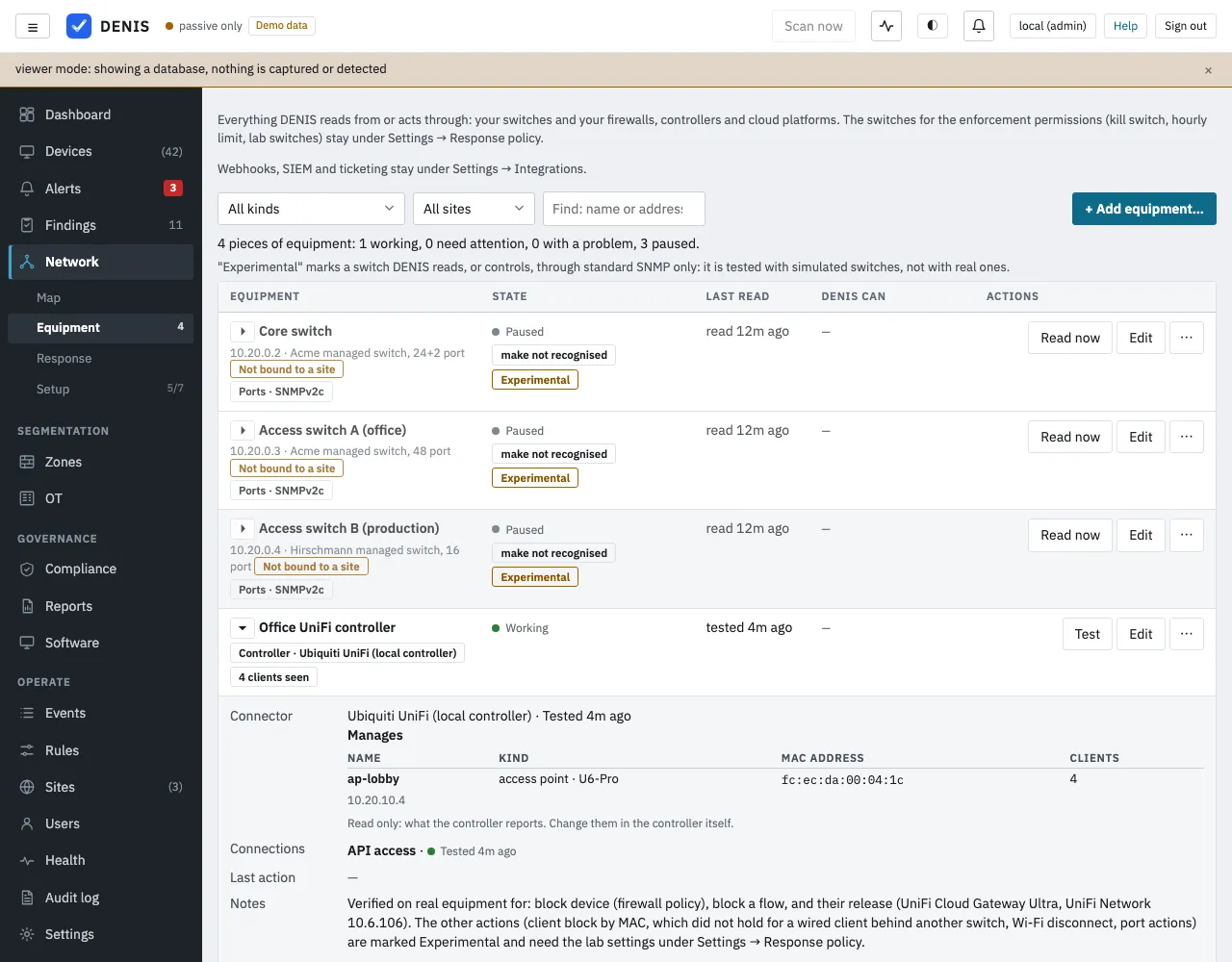
Every switch, firewall and controller DENIS reads from or acts through, with what it can do and how well that is tested.


Industrial visibility, the response plan, incidents and more: the full product tour →
How it works
From a spare machine to a picture of your network.
- 01
Deploy
One program on a small Linux server, a Raspberry Pi class machine or a Mac; the data stays in one local database file.
- 02
Connect a monitoring source
A mirror (SPAN) port or a tap shows who talks to whom. Without one, DENIS still discovers the devices on its segment.
- 03
Discover and observe
Devices appear with manufacturer, type and evidence. After 24 hours DENIS knows what is normal for each.
- 04
Investigate
Alerts explain what happened and why; related alerts become incidents with the device’s history.
- 05
Respond where it fits
Optionally, an administrator blocks or quarantines a device through supported switches and firewalls, after a preview.
Who DENIS is for
Practical security monitoring, not an enterprise platform.
For organisations with roughly a hundred to a thousand connected devices, looked after by people with other jobs too. NDR-style detection and NAC-style response, but not a replacement for an enterprise NDR, SIEM, EDR, NAC or OT security platform.
Industrial and manufacturing
Office IT, building systems and production controllers on one network. Passive visibility of industrial protocols, nothing sent to a controller.
Small and mid-size business
An office, a warehouse, a branch or two and no security team. One screen for every device and plain alerts.
Community and home labs
Self-hosters, admins, security engineers and students: every feature, free, for up to 100 devices.
Service providers: one installation can keep several customers apart, with collectors at each site. See DENIS for MSPs. There is no partner programme.
Community edition
Free for your own network, with every feature.
The Community edition is the same program, with nothing switched off. Its limits are the licence terms: personal, non-commercial use on one installation monitoring up to 100 devices. Organisations may evaluate it free for 30 days from the first installation.
- Self-hosted. Linux (x86-64 and ARM64, including Raspberry Pi), macOS and Docker. No DENIS account and no cloud.
- Built with its users. Questions and reports on GitHub and Discord shape what comes next.
Try the demo in two minutes
Download the program for your platform from the latest release, then:
$ mv denis-* denis && chmod +x denis
$ ./denis demo --db demo.db load && ./denis serve --db demo.db --insecure-no-auth
Open http://localhost:8080: a fictional company, no capture, this machine only.
Tested on the real thing
Verified with real equipment.
Response through these products was tested on real devices or controllers, for the actions and software versions listed on the supported infrastructure page.
- Cisco Catalyst
Cisco IOS 15.2(7)E4
- Palo Alto Networks
PAN-OS 10.1.14-h9
- Fortinet FortiGate
FortiOS 7.2.3
- MikroTik
RouterOS 7.21.4
- Ubiquiti UniFi
UniFi Network 10.6.106 on UniFi OS 5.1.33
- TP-Link Omada
Omada Controller 5.15
Every other integration is experimental: built and tested against simulated devices, and your reports from real equipment are welcome. The supported infrastructure page lists every product, which action was tested on which device, and the setup guides.
New in 4.4
Know where a device is plugged in, and write your own rules.
Where a device hangs on its controller or host, new Wi-Fi controller connectors (Omada since 4.4.2 verified, the others Experimental), twelve new detections, rules of your own with a trial mode, and a durable queue for alerts.
Developed in the European Union
Built in Europe. Designed for networks you control.
DENIS is developed in the European Union (Slovakia) and runs where your network is.
Self-hosted
DENIS runs on your own server, mini PC or Mac. There is no DENIS cloud service and no account to create.
No cloud needed to operate
Capture, detection, the console and the documentation run on that machine. The update check is on by default: it asks GitHub every six hours and sends nothing about your network; only if GitHub cannot be reached does it ask usedenis.com, which sees your address and the version asked for. It can be switched off.
Your security data stays with you
Devices, traffic records and alerts are kept in a database on your machine, with no telemetry. Only what you configure leaves it, such as notifications, exports or an optional AI provider.
This is about where DENIS runs, not a certification: using DENIS does not by itself make an organisation compliant with GDPR or NIS2. See what DENIS sends out and NIS2 and network visibility.
Security software should be straight about itself
- Every outbound request listed. No telemetry and no usage reporting; the five kinds of request a default install makes are documented and each can be switched off.
- Hardened and signed. Rust, fuzz-tested parsers, HTTPS by default, passkeys, roles, an audit log, signed updates with rollback.
- Honest about its status. Every integration says whether it was tested on real equipment or only in simulation.
Where to go next
Pick your starting point.
- DocumentationQuick start, console tour, deployment and every detection rule.
- Community editionFree for your own network: download, guides, GitHub and Discord.
- Industrial networksPassive IT and OT visibility for manufacturing and industrial sites.
- For organisationsUsing DENIS in a business, and how to register interest in a future evaluation.
Questions first? Read the frequently asked questions or what DENIS does, in plain words.